

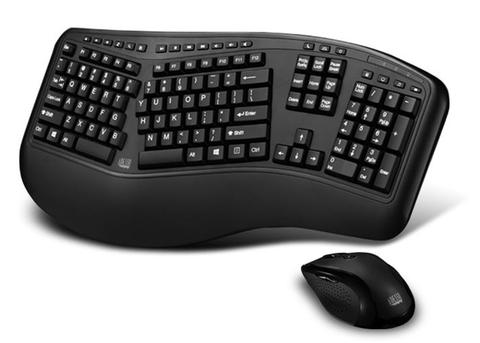
The ergonomic keyboard is a keyboard based of off the traditional "QWERTY" keyboard but is designed with ergonomic considerations.
Traditional keyboards are known
to cause many problems and injuries such as Carpal Tunnel, Tennis Elbow and even lumbar sprains and strains; the
ergonomic keyboard was designed to prevent these
problems and make computer work safer and more efficient.[2] One of the biggest differences in design between the traditional keyboard and Ergonomic Keyboard
is that it is constructed in a V-shape. The V-shaped keyboard aligns our hands to natural human form, whereas a traditional keyboard
forces our hands to bend
outwards putting strain on our wrist and negatively affecting our body. [3]
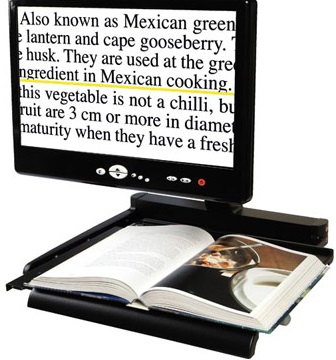
As seen below, a desktop magnifying tool is an electronic device that uses a camera and a display screen to perform digital magnifications
of printed materials. This
tool was designed to enlarge printed pages for those with poor vision, but are also now being used in schools as a means of presenting
information. A camera
connects to a monitor that displays real-time images, and the user can control settings such as magnification, focus, contrast, underlining and
highlightin.
Some are portable with handheld cameras, while others are much larger and mounted on a fixed stand.[4]
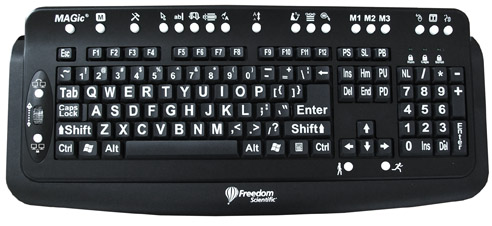
A multimedia keyboard has large letters printed on the keys, there are many different types of multimedia keyboards but most are similar
to the one shown below. It was designed specifically for those with conditions that involve visual impairments problems such as macular
degeneration, glaucoma,
diabetic retinopathy, cataracts and age-related vision loss. There are many different features multimedia keyboards
can offer, on the keyboard shown, the round
buttons at the top control software which can magnify the screen (zoom in), change the
background colour of the screen, or make the mouse cursor on the screen larger.
The bump dots on the keys, installed in this case
by the organization using the keyboards, help the user find the right keys in a tactile way. The size of the letters
on each key are
also much bigger than normal and are designed to be easy to see in low light conditions. With a bigger and bolder typeface,
the keys are easier to see as well.
multimedia keyboards have been around for a while and continue to be
used around the world.[5]
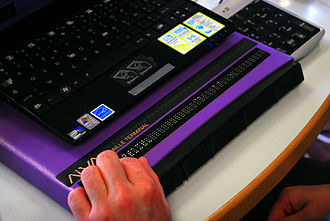
A refreshable braille display also known as a braille terminal is an electro-mechanical device used for displaying braille characters.
It usually does so by using
round-tipped pins that raise through holes in a flat surface that respond to a computers directions. Computers users who
cannot use a computer monitor
because of a disability or vision problem normally use it to read a braille output version of the displayed text. It was
designed for the blind as well
as people who have problems looking at a computer.[6]
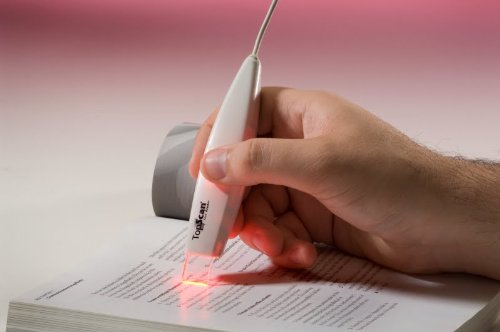
Text to Speech Scanners are hand held devices that can scan text then narrate it, convert it into a written document
or find specific information
in text. They usually connect to most digital devices including, laptops, computers, smartphones and tablets. They are
a fairly new technology,
and are operated by the user holding the scanner over the desired text. Software comes available when you buy the scanner and you can
change the sound of the voice speaking, speed and language.[7]
A digital recorder is a device that effectively takes audio content and transcribes it into written words in a word processor or other display
destination. This type of speech recognition is extremely valuable to anyone who needs to generate a lot of written content without a lot
of manual typing. It is also useful for people with disabilities that make it difficult for them to use a keyboard. Most digital
recorders can
record both near sound and distance sound (conferences and meetings), and many come with software that allows the user to
download
whatever has been recorded to a computer; or can connect via blue tooth or wire. They usually work with every personal
digital
device, including computers,smartphone and tablets. Digital recorders can also be used as speech to text microphones.[8]

_______________________________________________________________________________________________________________________________________________________________________________________
Works Cited
[1] "Adaptive Technology." Adaptive Technology | DO-IT, www.washington.edu/doit/adaptive-technology.
[2] Department of Health & Human Services. "Computer-Related injuries." Better Health Channel, Department of Health & Human Services, 31 May 2015, www.betterhealth.vic.gov.au/health/healthyliving/computer-related-injuries.
[3] "Ergonomic keyboard." Wikipedia, Wikimedia Foundation, 22 Jan. 2018, en.wikipedia.org/wiki/Ergonomic_keyboard.
[4] "Assistive technology." Wikipedia, Wikimedia Foundation, 3 Feb. 2018, en.wikipedia.org/wiki/Assistive_technology.
[5] "Assistive Technology Approaches for Improved PC Access." Microsoft Office, support.office.com/en-us/article/Assistive-Technology-Approaches-for-Improved-PC-Access-f5f725be-0a1b-4c78-a561-88682d3ce4a6.
[6] "Refreshable braille display." Wikipedia, Wikimedia Foundation, 24 Jan. 2018, en.wikipedia.org/wiki/Refreshable_braille_display.
[7] "Voice Stick : Portable Text Scanning Device For The Visually Impaired - Tuvie." Tuvie - Modern Industrial Design Ideas and News, www.tuvie.com/voice-stick-portable-text-scanning-device-for-the-visually-impaired/.
[8] "Digital recording." Wikipedia, Wikimedia Foundation, 27 Jan. 2018, en.wikipedia.org/wiki/Digital_recording.